
Analyze a website
The Website Import Analyst is one agent that looks at a website the way an SEO consultant would on day one. It reads the live site, checks the code if you connected a repository, measures speed, works out your niche and market, finds who you actually compete with, pulls the keywords each of them ranks for, and writes the buyer personas those keywords point to. Everything it finds lands in your workspace, so you open the results instead of reading a report.
It never makes up a keyword, a search volume or a competitor. Every number comes from DataForSEO in your market, and every competitor comes from real Google results or from your own site.
Start an analysis
When you add a website. In the project wizard's Website step, leave Analyze the website right after adding it ticked, then add or link the site. The analysis starts as soon as the site is linked.
On a site you already have. Open Agents > Library, pick Website Import Analyst, and run it with a message like this:
Run the full import analysis. Website: https://websites.devghouse.com. GitHub repository: none. Business knowledge: we build and host websites for small businesses and founders. Market override: none.
Only the website is required. Leave the repository out to skip the code audit, and leave the market out to let the agent decide it from the site.
From your own assistant. Anything connected to DevGhouse over MCP can run the same agent with run_agent, or call the individual tools listed at the bottom of this page.
Watch it work, or close the tab
A checklist appears under the linked website and moves as the agent works:
- Reading your site
- Auditing your code (only when a repository is attached)
- Measuring performance
- Finding your niche and local market
- Finding your real competitors
- Naming the market leaders
- Pulling every domain's keywords
- Writing your buyer personas
- Choosing keywords for your personas
- Writing the audit and report
You can close the tab at any point. The analysis keeps running on DevGhouse, and you get a notification with a link to the website when the results are in.
What you get, and where to find it
| Result | Where it lands |
|---|---|
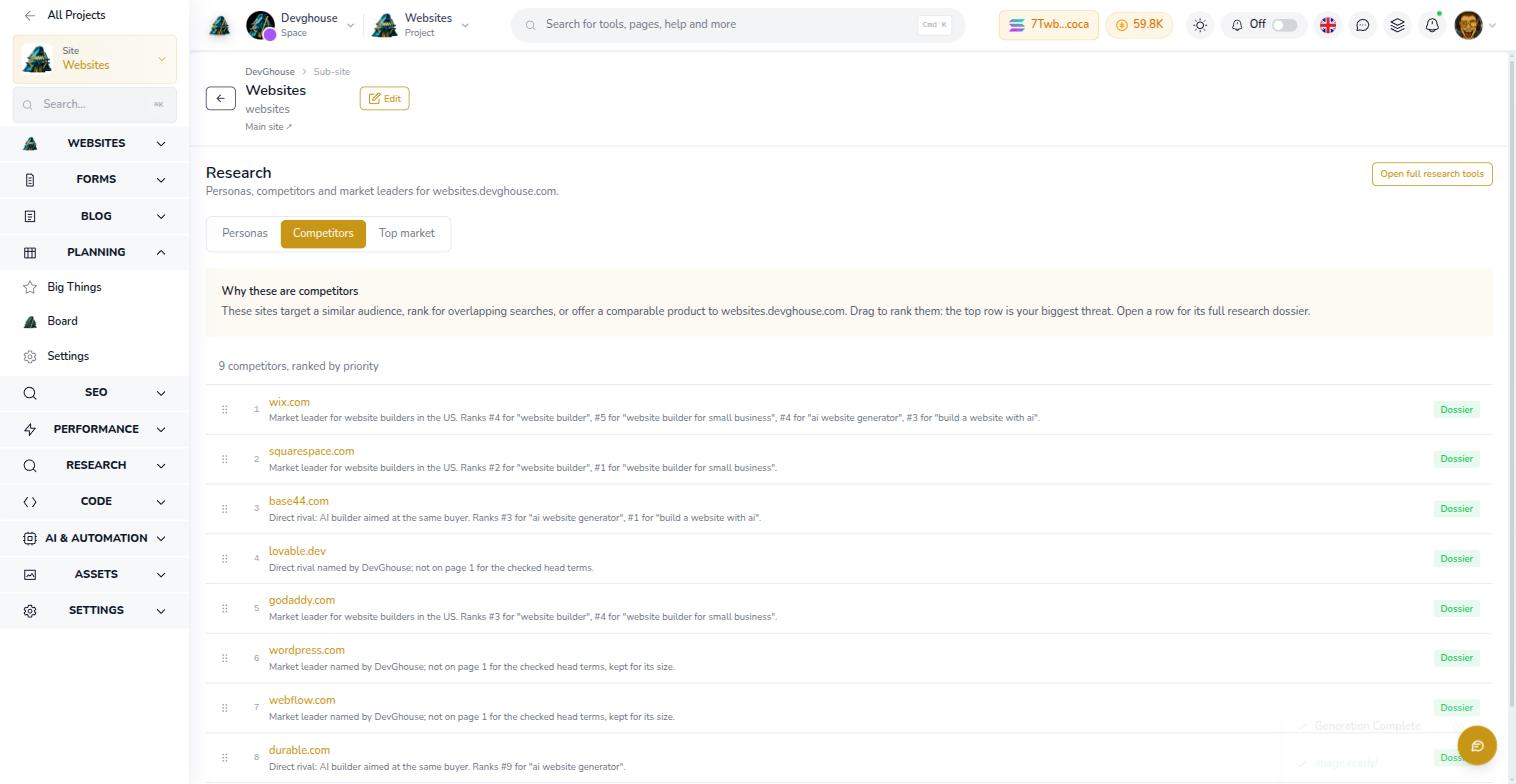
| Competitors, each with a reason, monthly traffic and a dossier of the searches it wins | Research > Competitors, ranked by priority. Drag rows to change the order. |
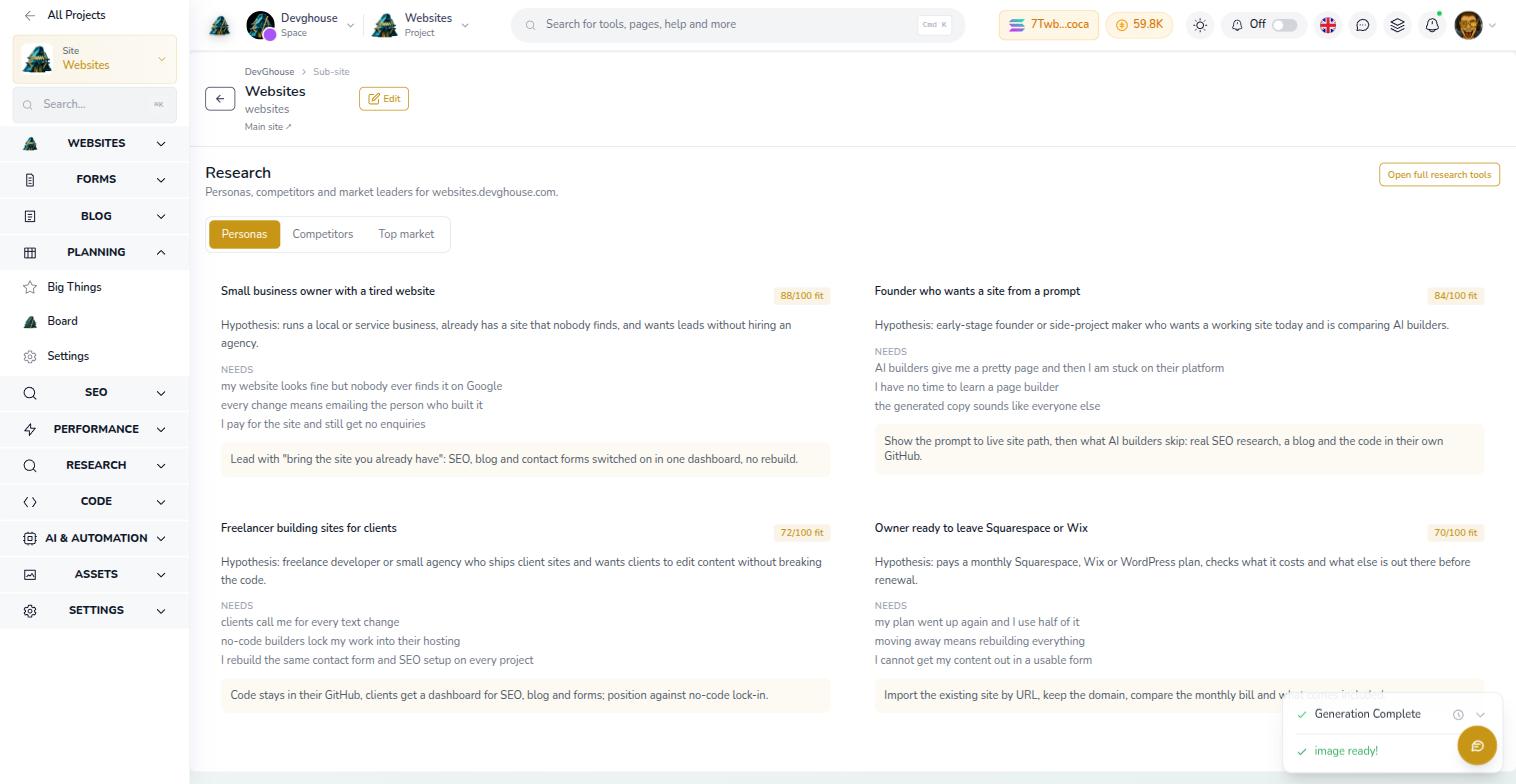
| Buyer personas with their pains, what they want and how to win them | Research > Personas |
| Keywords grouped by persona, with volume, cost per click, difficulty and intent | SEO > Keywords |
| Audit with a score, the top issues across code, speed and SEO, and pages or posts to create | SEO > Audits |
| Speed report for your homepage | Performance |
| A research note added to the website's knowledge base, so every later agent writes for the right audience | The website's Knowledge tab, under "What agents should know about this site" |
| A readable report of the whole run, including what was skipped and why | Agents: the run's conversation ends with a summary, and the full report is on the agent's page |
How it decides
- Market first. It reads your address, phone format, currency, language and service area, then picks the country or city and language to research. A local business gets its own market, not the United States by default. Every later lookup uses that market.
- Competitors from real results. It asks DataForSEO which domains compete with yours. A new site usually has none yet, so it also checks the Google top 10 for the three to five searches a customer would type. Forums, review sites, directories and marketplaces are kept out of the list and marked as excluded with the reason.
- Leaders sit in the same list. The big names customers compare everyone against are ordinary competitors with a leader label, not a separate tab.
- Keywords per domain. For your site and every competitor, it pulls the keywords each one ranks for, plus the ones you share with your closest rivals. If that pool is thin, it widens it with DataForSEO keyword ideas, never with guesses.
- Personas are hypotheses. Each one starts with "Hypothesis:" until your knowledge base confirms that audience, and lists the keywords and pages it was built from.
- Keywords for your personas. The final list is chosen only from that real pool, favoring searches you can win and that show buying intent.
What it costs
- Each DataForSEO lookup is 1 credit. One analysis stays under 60 lookups; the websites.devghouse.com run below used 19.
- The homepage speed check is free. A whole-site speed audit costs 5 credits per page and only runs if you ask for it.
- The agent itself runs on your context's own AI subscription, or on metered credits when none is linked.
Example: websites.devghouse.com
DevGhouse ran the analysis on its own Websites product, in the United States English market.
- 9 competitors. Leaders: Wix, Squarespace, GoDaddy, WordPress.com and Webflow. AI builders: Base44, Lovable, Durable and Readdy. Reddit, Wikipedia and three review sites were excluded as noise.
- 4 personas. A small business owner with a tired website, a founder who wants a site from a prompt, a freelancer building sites for clients, and an owner ready to leave Squarespace or Wix.
- 43 keywords. 12 of them name a competitor, such as "squarespace website pricing" (18,100 searches a month, difficulty 14) and "lovable website builder" (1,600, difficulty 0). The easiest large openings were "freelance website portfolio" (14,800, difficulty 2) and "company website design" (14,800, difficulty 20).
What it does not do
- It never changes your pages, page titles, brand, content or repository, and never publishes anything. It only writes research, the audit, the report and a note in the knowledge base.
- It stops if the website is not in your workspace yet. Add the site first.
- The code audit reads up to 15 key files (framework config, page head setup, sitemap, robots, dependencies). It reports a file path if something looks like a committed secret, never the secret itself.
- A keyword row records its volume and difficulty but not which competitor it came from. That link lives in each competitor's dossier and in the report.
Tools it uses
For assistants and routines working over MCP: scrape_website_assets, custom_website_page_meta_list, github_get_repository, github_get_file_content, custom_website_performance_run, seo_query, custom_website_seo_curate_competitors, custom_website_seo_set_competitor_research, custom_website_seo_store_personas, custom_website_seo_store_keywords, custom_website_seo_store_audit, custom_website_seo_store_audit_actions, custom_website_knowledge_set and create_report.