
Crypto
Crypto, at crypto.devghouse.com, is where you launch a token, give it a real public page, and either trade it yourself or let a bounded automated strategy do it for you. It shares your DevGhouse account, your credit balance and your workspace with every other DevGhouse product, so nothing here needs a separate sign-up. The same tools also live inside your workspace, in the Crypto module of app.devghouse.com: a desk with your wallet, your drafts and your live coins in one place.
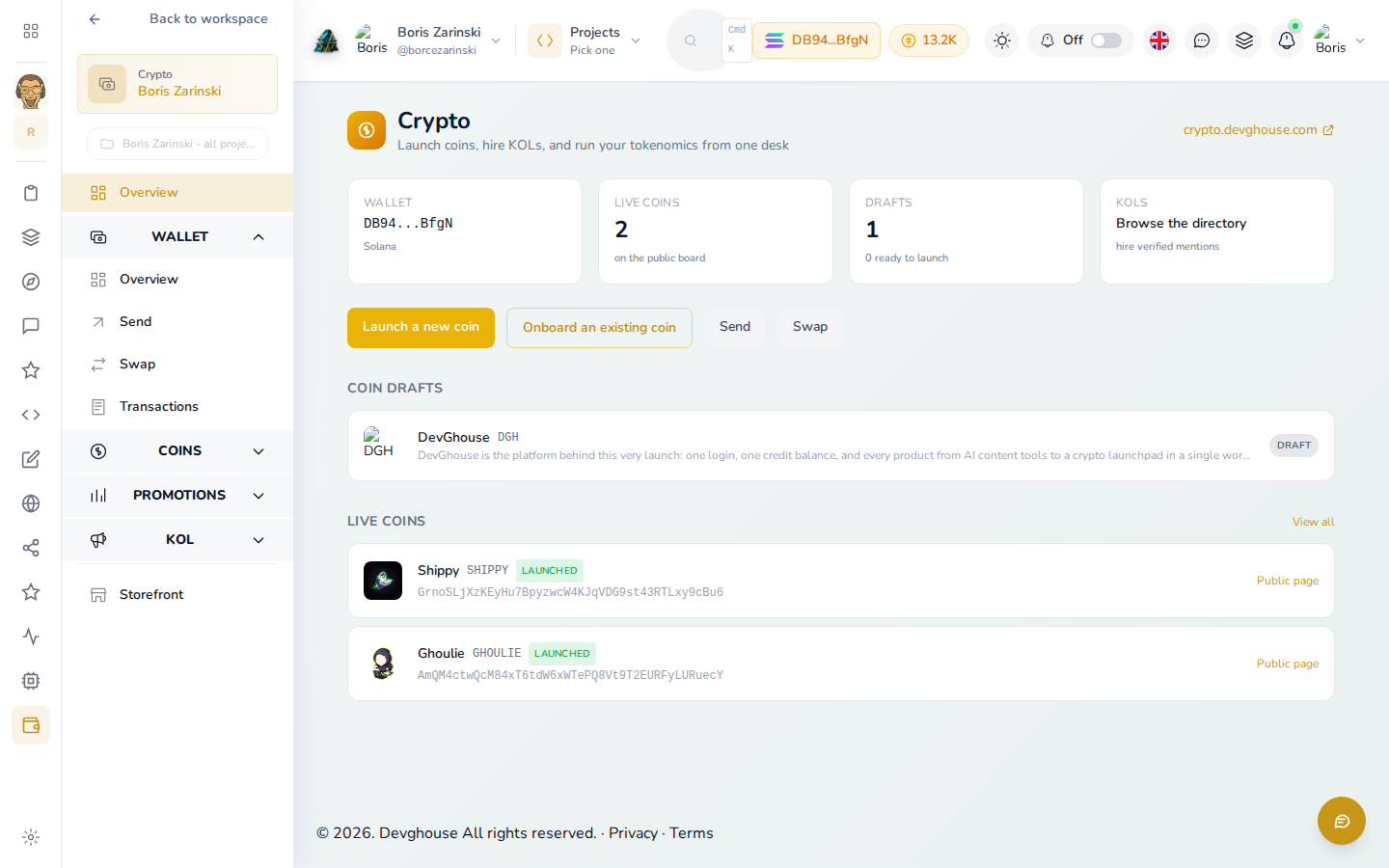
Who this is for
- Founders and creators who want to launch a coin with a real story, a logo, updates and a public page, not just a raw contract address.
- Traders who want to browse what is live, buy into a coin, or run a bounded automated strategy on perpetual futures instead of watching charts all day.
- Crypto influencers (KOLs) who want a public profile that brands and creators can find and hire from.
- Anyone who just wants to see what is being launched on DevGhouse right now.
What you can do
| Feature | What it does |
|---|---|
| Get started | Sign up, and use the goal picker at /start to land on the right first step, whether that is a wallet, a launch, or connecting an AI agent. |
| Browse coins | See every coin launched on DevGhouse, open a coin's own page, and buy in with your own Phantom wallet. |
| Launch a coin | Save a draft, check what is still missing, publish a page for it, and mint it on Solana or Base once it is ready. |
| Trade with a strategy | Deploy a bounded, one-click automated perpetuals strategy, or open your own position by hand, with a hard cap on how much it can risk. |
| Creators and KOLs | See who launched a coin, follow a crypto influencer's calls, or register your own hireable KOL profile. |
| Credits and the entry fee | Understand the one-time fee that unlocks launching, and how to add credits to your balance. |
| Connect an AI assistant | Let Claude, Codex or another assistant draft, launch, trade or manage a coin on your behalf, with your approval on anything that spends money. |
Two related things live one click away but are not this guide: Predictions (a separate prediction-market product, linked from Crypto's own navigation) and the DGH tokenomics page on devghouse.com, which documents how DevGhouse's own coin is split on each payment and links the weekly giveaway.
How it fits your workspace
Crypto is one of many product frontends built on the same DevGhouse account. Your login, your credit balance and your workspace context are shared everywhere:
- Your platform wallet (the one that signs a mint or a trade) is managed from your workspace, not from Crypto itself.
- If you switch your workspace from your personal account into a shared team workspace, the coins, drafts and credits you see in Crypto switch with it. Always check which context you are in before you launch or spend anything.
- A coin's page-building tools (adding sections, a gallery, an anthem) open in your workspace at
app.devghouse.com/coins/design, right next to the Crypto app.
Run it with an AI assistant
If you connect Claude, Codex or another assistant to your DevGhouse workspace, it can do almost everything this guide covers on your behalf, through the launchpad module:
- Drafting and launching:
coin_draft_create,coin_draft_gate,coin_draft_update,coin_create - Building the coin's public page:
coin_design_save,coin_section_add,coin_design_publish - Browsing and checking on coins:
coin_leaderboard,coin_get,coin_list_mine,coin_by_creator - Trading:
pumpfun_swap(buy or sell on the bonding curve),perp_open/perp_close(leveraged positions with required take-profit and stop-loss) - Rewards to holders:
coin_vault_ensure,coin_airdrop_create,coin_airdrop_execute,coin_vesting_register - Becoming a KOL:
kol_prefill_from_twitter,kol_register - Prediction markets:
prediction_trade,prediction_positions,prediction_create_market
Every one of these that spends credits, mints a coin, or moves money asks the assistant to check your wallet balance first and get your explicit approval before it acts, the same way a person would confirm before clicking Launch. See Connect an AI assistant for how to set this up, and the full tool list is documented for developers in the platform's MCP server (module launchpad).
Credits
Browsing coins, reading a coin's page, and looking at the leaderboard are free. Spending starts with a one-time entry fee to unlock launching and trading, then a smaller cost per action after that (minting, swapping, opening a leveraged position). See Credits and the entry fee for the exact numbers and how to add credits.